
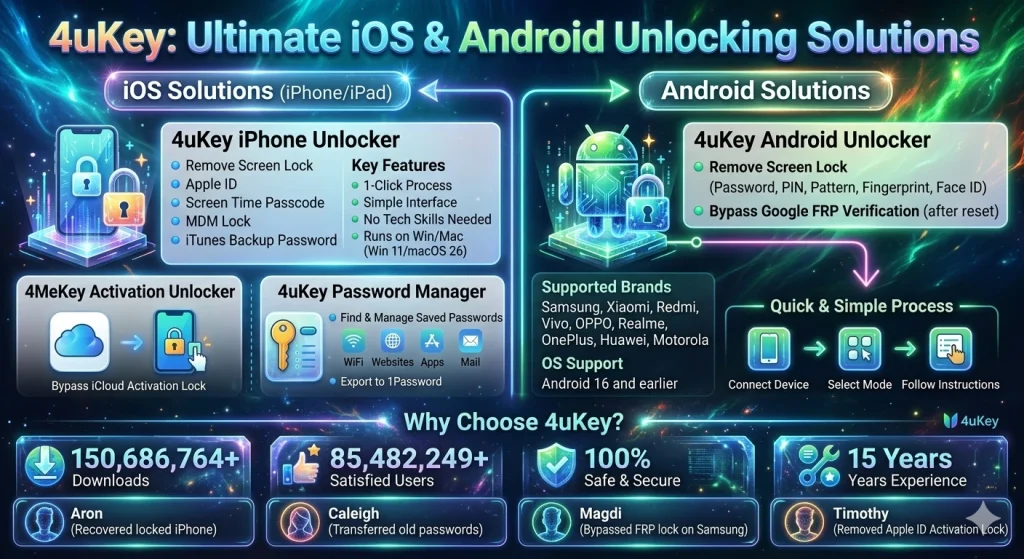
4ukey A:0G0BL is a device unlocking solution designed to help users regain access to locked iOS devices. In these situations, 4uKey iPhone Unlocker provides a simple way to remove different locks and restore device access.
The software runs on PC and Mac systems and supports Win 11/10/8/8.1/7 and macOS 26. Users only need to connect their iPhone or iPad to the computer, select the unlocking option, and follow the on-screen instructions.
4uKey iPhone Unlocker can remove several types of locks, including:
- iPhone Screen Lock
- Apple ID lock
- iCloud Activation Lock
- Screen Time Passcode
- MDM lock
- iTunes backup password
The unlock process usually takes only a few steps. The interface is simple, so users do not need technical knowledge. This makes the tool helpful for forgotten passcode recovery, disabled iPhone unlocking, and general iPad unlock assistance.
Securely Unlock Android Screen and FRP in Seconds
Android users can also face lock problems. Sometimes people forget their screen PIN or pattern. In other cases, the device asks for Google verification after a factory reset. 4uKey Android Unlocker helps solve these problems.
4uKey Android Unlocker removes Android Screen Lock and bypasses Factory Reset Protection (FRP). FRP is a security feature that requires the original Google account after a reset.
This software supports many Android brands, including:
- Samsung
- Xiaomi
- Redmi
- Vivo
- OPPO
- Realme
- OnePlus
- Huawei
- Motorola
The tool also supports Android 16 and earlier versions. Users can remove different lock types such as password, PIN, pattern lock, fingerprint lock, and face unlock.
The process is quick and simple. Connect the device to a PC or Mac, select the unlock mode, and follow the steps. This provides a practical Android bypass solution for emergency device access.
The Ultimate iOS Password Manager
Passwords are stored in many places on an iPhone or iPad. These include WiFi networks, apps, websites, and email accounts. 4uKey Password Manager helps users find and manage these saved passwords.
The tool scans the iOS device and displays stored login details on the computer. Users can then export or save the passwords for backup.
Supported password types include:
- WiFi passwords
- Website login credentials
- App account details
- Mail and Apple ID information
The manager also supports exporting passwords to other tools such as 1Password. This feature helps users organize their login data and avoid losing important accounts.
4uKey Android Unlocker
4uKey Android Unlocker is a software solution designed to remove screen locks from Android devices. It supports a wide range of devices and operating system versions.
Common situations where users need this tool include:
- Forgotten PIN or pattern lock
- Locked Android tablet or phone
- Google FRP verification after reset
- Device access blocked due to multiple wrong attempts
The software provides a simplified unlock process so users can regain access to their phones without advanced technical knowledge.
4uKey iPhone Unlocker
4uKey iPhone Unlocker focuses on solving iOS lock issues. The tool works with iPhone, iPad, and iPod devices and supports multiple unlock modes.
Key features include:
- Removing iPhone Screen Lock
- Unlocking Apple ID without password
- Bypassing Screen Time passcode
- Removing MDM restrictions
- Unlocking disabled iPhones
This makes it useful when users forget their passcode or cannot access their Apple account.
4MeKey Activation Unlocker
4MeKey Activation Unlocker helps remove the iCloud Activation Lock. This lock appears after a factory reset if the device still has an Apple ID linked to it.
4MeKey Activation Unlocker helps bypass the activation step and allows users to continue using the device.
The tool is designed for situations where users need iCloud activation removal to regain device access.
4uKey iTunes Backup Unlocker
Some users create encrypted backups in iTunes to protect their data.
4uKey iTunes Backup Unlocker helps recover or remove the forgotten iTunes backup password. After unlocking the backup, users can access and restore their saved files.
This feature is useful for people who want to recover data stored in old encrypted backups.
4uKey Password Manager
4uKey Password Manager allows users to view and manage passwords stored on their iPhone or iPad.
The software scans the device and shows all saved accounts in one place. Users can export the data to a secure file or move it to other password managers.
This helps keep login information organized and prevents account access problems.
Why Choose4ukey?
4ukey tools focus on reliable device unlocking and simple user experience. The software is designed to help people regain access to their devices quickly and safely.
150,686,764
More than 150,686,764 downloads worldwide show that many users rely on 4ukey tools for device unlocking.
85,482,249
Over 85,482,249 satisfied users have successfully unlocked their devices using the software.
100%
The system provides a 100% safe and secure process designed to protect device data during unlocking.
15 Years
The development team has 15 years of experience working on device unlocking and password recovery tools.
Recommended by Experts
Technology experts and reviewers often mention key tools when discussing device unlocking solutions.
Experts highlight several advantages:
- 4uKey iPhone Unlocker removes passcodes and Apple ID locks from iOS devices.
- 4uKey Android Unlocker bypasses Google FRP verification and Android screen locks.
- 4MeKey Activation Unlocker helps remove the iCloud activation screen.
These tools are widely used by technicians and everyday users who need a reliable unlock solution.
Listen to Our Customers
Many users have shared their experience after using 4ukey software.
Aron
He used a 4uKey iPhone Unlocker to remove the lock and then restored his data from a backup.
Caleigh
Caleigh used 4uKey Password Manager to transfer saved passwords from an old iPhone to a new device. The tool helped recover WiFi and website login details.
Magdi
Magdi’s Samsung phone was locked after a reset and asked for Google account verification. 4uKey Android Unlocker helped bypass the FRP lock.
Timothy
Timothy forgot the Apple ID password on an iPad. 4MeKey Activation Unlocker helped remove the activation lock and restore access.
Hot Articles
iPhone Screen Lock
This section explains solutions for unlocking iPhone and iPad devices when the passcode is forgotten.
Common guides include:
- How to Factory Reset iPhone without Password
- How to Unlock iPhone without iTunes and Passcodes
- Can’t Remember iPhone Passcode? Best Way to Unlock
- 4 Ways to Unlock iPhone 14 without Passcode or Face ID
iCloud Activation Lock
This section focuses on iCloud activation removal and explains methods to bypass the activation lock when Apple ID credentials are unavailable.
Apple ID Password
Users who forget their Apple ID password can find guides on removing Apple ID from iOS devices and restoring account access.
Android Screen Lock
Android Screen Lock guides explain how to remove password, PIN, or pattern locks from Android devices.
Samsung FRP Lock
Samsung FRP Lock guides explain how to bypass Google verification after a factory reset.
iPhone Screen Lock
Learn how to unlock iPhone without passcode and regain access to iOS devices.
iCloud Activation Lock
Discover ways to remove the activation lock after resetting an iPhone or iPad.
Apple ID Password
Find solutions for removing Apple ID when the password is forgotten.
Android Screen Lock
Learn methods to unlock Android phones and tablets when the screen lock is unknown.
Samsung FRP Lock
Understand how to bypass Google account verification on Samsung devices.
4uKey
4uKey tools combine several unlock solutions for both iOS and Android devices.
Provide All iOS and Android Password Solutions
iOS and Android Password Solutions
4ukey A:0G0BL provides a complete set of tools designed to solve device lock and password problems.
The system includes:
- 4uKey iPhone Unlocker
- 4uKey Android Unlocker
- 4MeKey Activation Unlocker
- 4uKey iTunes Backup Unlocker
- 4uKey Password Manager
Together, these tools help users unlock devices, recover passwords, and bypass restrictions.
The result is versatile device unlocking, reliable access recovery, and a simple solution for both iOS and Android password problems.